
Your SINGER C440 Legacy
Singer's instructions rewritten in plain English, with every setting kept exactly as Singer intended, and with tips from our team added along the way. Stuck on something? Ask the Live Sewing Advisor at any point.
This manual applies to UK spec machines.
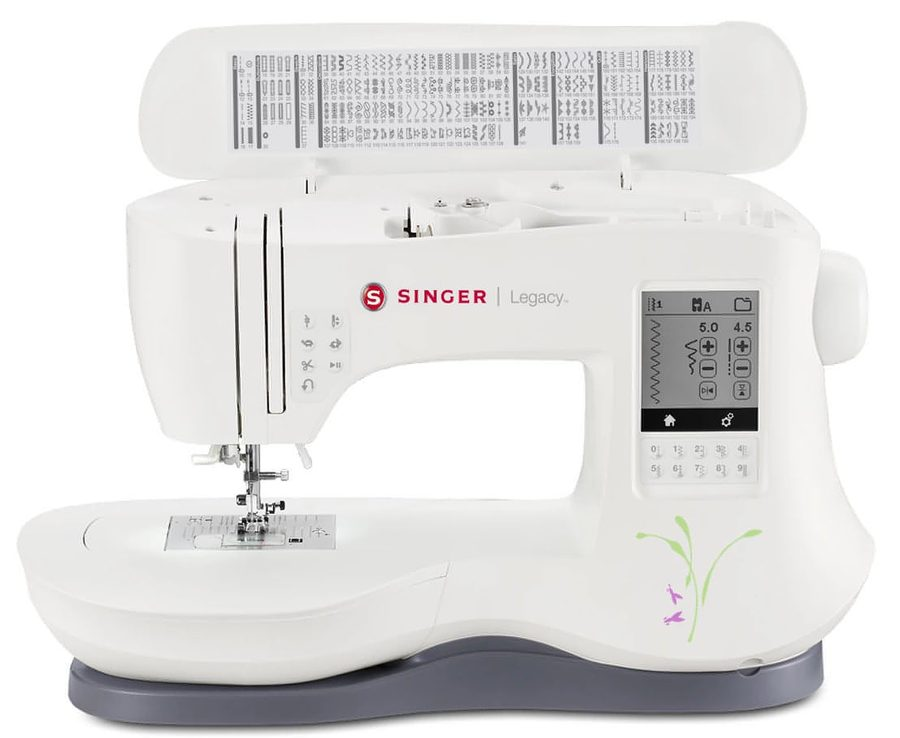
Main things to know
Getting to know your machine
Important safety instructions
Read all the instructions before using this household sewing machine. When using an electrical appliance, basic safety precautions should always be followed, including the ones below. This machine is designed to comply with IEC/EN 60335-2-28 and UL 1594.
- Keep these instructions close to the machine, and pass them on if the machine is given to someone else.
DANGER - to reduce the risk of electric shock
- Never leave the machine unattended while it is plugged in. Always unplug it from the socket straight after use, and before cleaning, removing covers or making any other adjustment mentioned in this manual.
WARNING - to reduce the risk of burns, fire, electric shock or injury
- Do not let the machine be used as a toy. Take close care when it is used by or near children.
- Only use the machine for its intended purpose, as described in this manual. Only use attachments recommended by the manufacturer, as listed in this manual.
- Never use the machine if the cord or plug is damaged, if it is not working properly, or if it has been dropped, damaged or dropped into water. Take it to your nearest authorised service centre to be examined, repaired or adjusted, electrically or mechanically.
- Never use the machine with any of its air openings blocked. Keep the ventilation openings free from lint, dust and loose fabric.
- Keep your fingers away from all moving parts. Take special care around the needle.
- Always use the correct needle plate. The wrong plate can cause the needle to break.
- Do not use bent needles.
- Do not pull or push the fabric while sewing. It can bend the needle and make it break.
- Wear safety glasses.
- Turn the power switch to O (off) when making any adjustments in the needle area - threading the needle, changing the needle, threading the bobbin, changing the presser foot and so on.
- Never drop or insert any object into any opening.
- Do not use outdoors.
- Do not use where aerosol (spray) products are being used or where oxygen is being given.
- To disconnect, turn all controls to off (O), then take the plug out of the socket.
- Do not unplug by pulling the cord. Hold the plug, not the cord.
- The foot control is used to run the machine. Avoid putting anything else on the foot control.
- Do not use the machine if it is wet.
- If the LED light is damaged or broken, it must be replaced by the manufacturer, its service agent or a similarly qualified person, to avoid a hazard.
- If the foot control cord is damaged, it must be replaced by the manufacturer, its service agent or a similarly qualified person, to avoid a hazard.
- This machine is double insulated. Only use identical replacement parts. See Servicing double insulated products below.
- Only use the foot control supplied with the machine, or one supplied by an approved SINGER retailer.
For Europe
This appliance can be used by children aged 8 and over, and by people with reduced physical, sensory or mental capabilities or lack of experience and knowledge, if they have been given supervision or instruction on using it safely and understand the hazards involved. Children must not play with the appliance. Cleaning and user maintenance must not be done by children without supervision. The noise level in normal use is less than 70dB.
Servicing double insulated products
A double insulated product has two systems of insulation instead of an earth. No earth is provided, and none should be added. Servicing needs great care and knowledge of the system, and should only be done by qualified service staff. Replacement parts must be identical to the parts in the product. A double insulated product is marked "DOUBLE INSULATION" or "DOUBLE INSULATED". Servicing should be done by an authorised service representative.
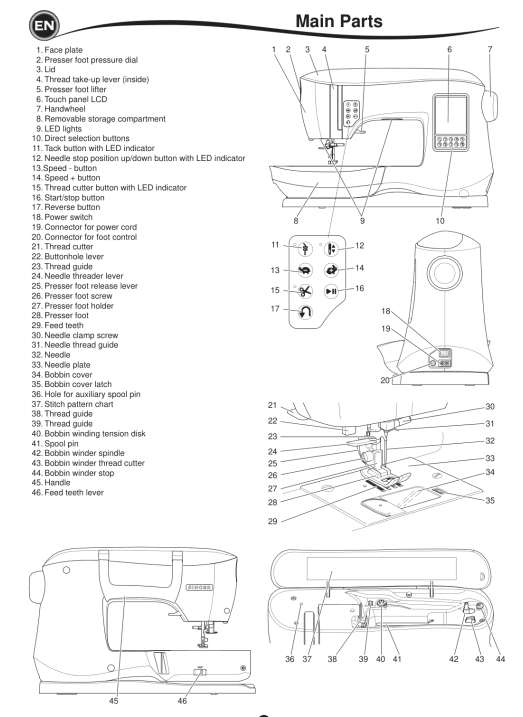
Main parts
- Face plate
- Presser foot pressure dial
- Lid
- Thread take-up lever (inside)
- Presser foot lifter
- Touch panel LCD
- Handwheel
- Removable storage compartment
- LED lights
- Direct selection buttons
- Tack button with LED indicator
- Needle stop position up/down button with LED indicator
- Speed - button
- Speed + button
- Thread cutter button with LED indicator
- Start/stop button
- Reverse button
- Power switch
- Connector for power cord
- Connector for foot control
- Thread cutter
- Buttonhole lever
- Thread guide
- Needle threader lever
- Presser foot release lever
- Presser foot screw
- Presser foot holder
- Presser foot
- Feed teeth
- Needle clamp screw
- Needle thread guide
- Needle
- Needle plate
- Bobbin cover
- Bobbin cover latch
- Hole for auxiliary spool pin
- Stitch pattern chart
- Thread guide
- Thread guide
- Bobbin winding tension disc
- Spool pin
- Bobbin winder spindle
- Bobbin winder thread cutter
- Bobbin winder stop
- Handle
- Feed teeth lever
Accessories
The accessories are stored in the removable storage compartment.
Supplied with the machine
- Needle pack
- 5 SINGER Class 15 bobbins (transparent) - one is in the machine when it arrives
- Seam ripper
- Brush
- Screwdriver
- Auxiliary spool pin
- Felt pads
- Screwdriver for the needle plate
- Spool cap, large
- Spool cap, small
- Edge / quilting guide
- Thread net
- Foot control
- Power cord
Presser feet
- All purpose foot (A) - on the machine when it arrives
- Satin foot (B)
- Overcasting foot (C)
- Blind hem foot (D)
- Zipper foot (E)
- Buttonhole foot (F) and underplate
- Straight stitch / patchwork foot (G)
- Button sewing foot (M)
- Open toe foot (N)
Optional extras (not supplied)
- Walking foot
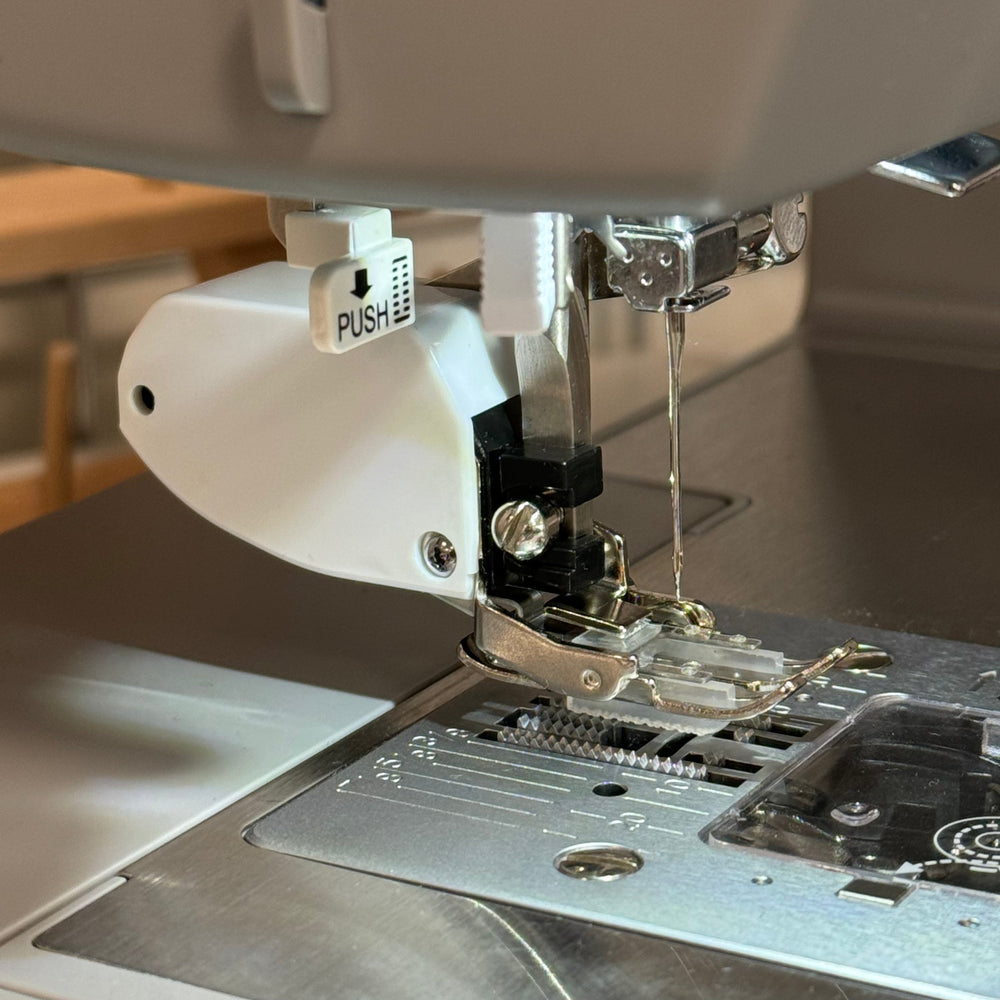 Walking Foot£29.99
 - Darning / free motion foot - for free motion sewing with the feed teeth lowered
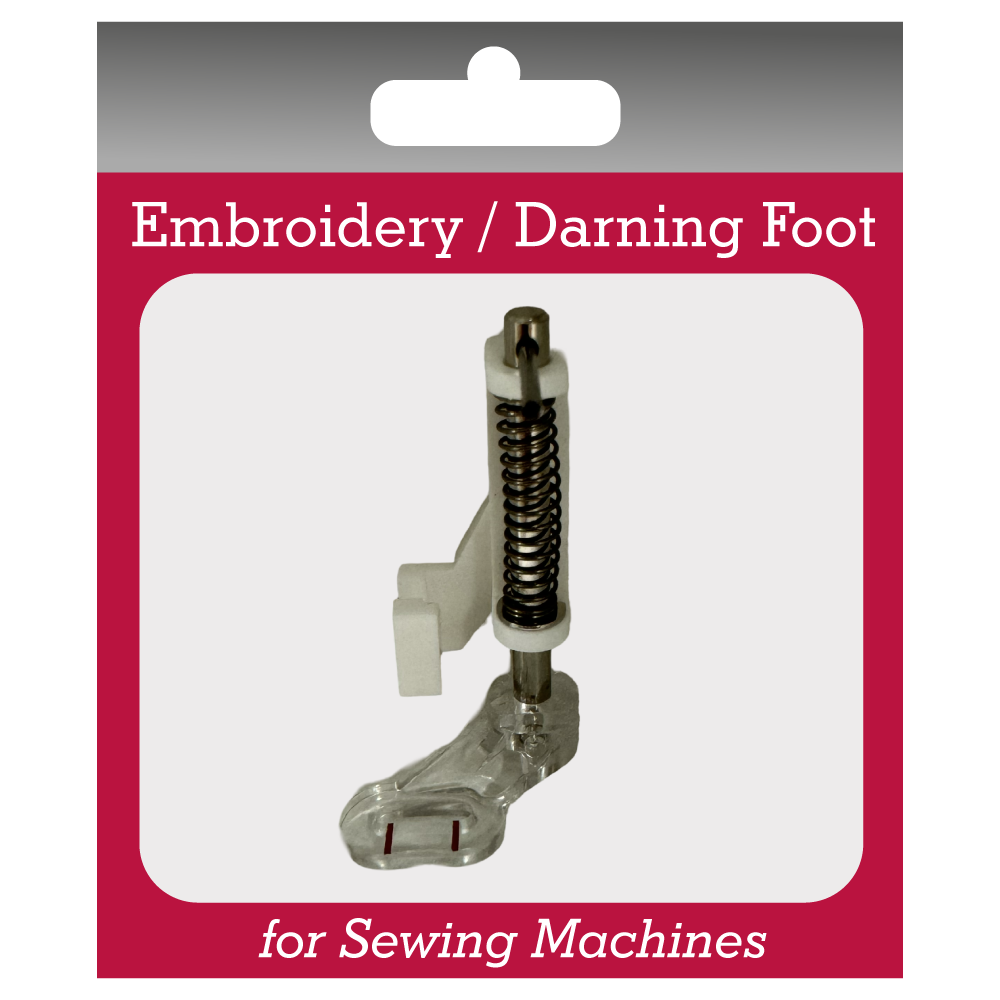 Darning / Free Motion Foot£12.99
 - Invisible zipper foot
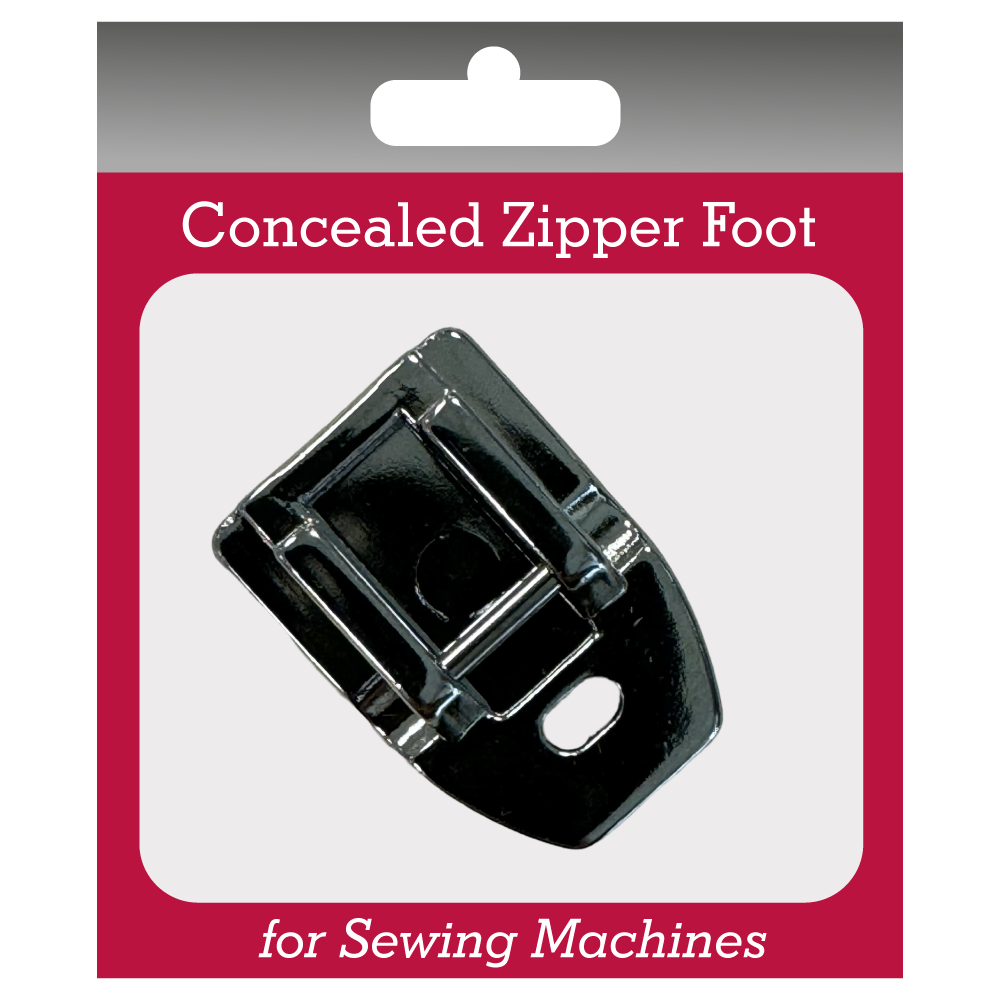 Invisible Zipper Foot£11.99
 - SINGER twin needles - a twin needle is not supplied
Useful for this
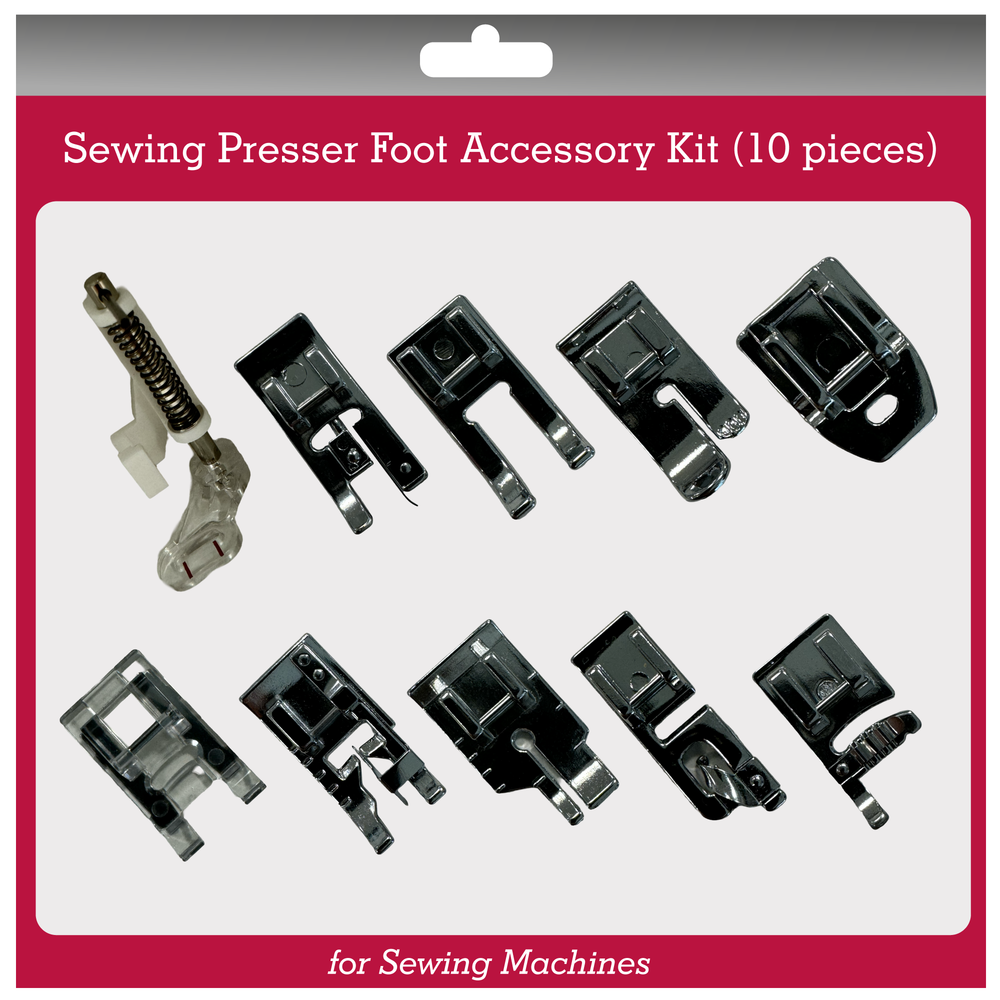 10-piece Presser Foot Kit£29.99Walking Foot (Even Feed)£29.99Darning / Free Motion Foot£12.99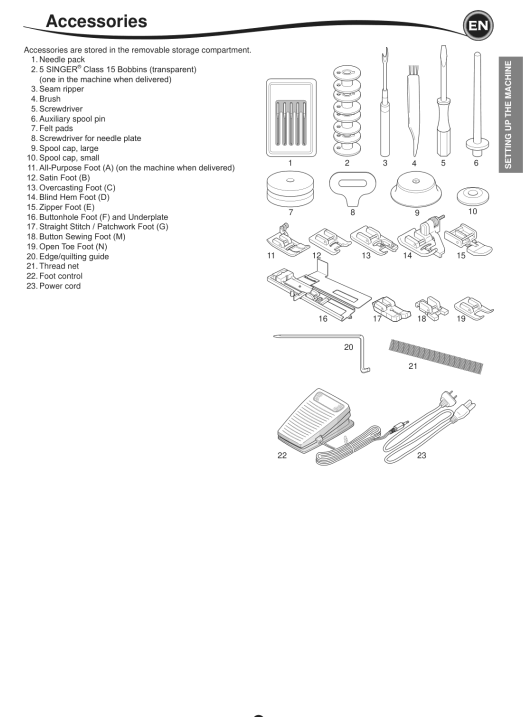
Storage compartment and free arm
Opening the accessory tray
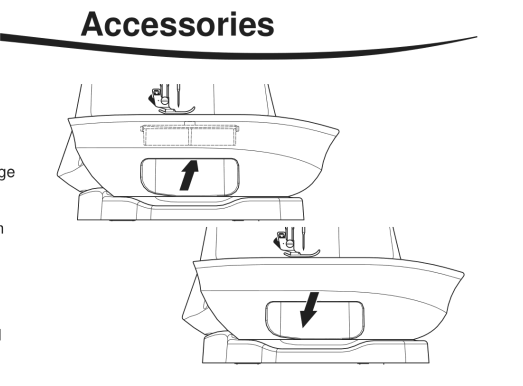
The accessories are kept in the tray of the removable storage compartment. To open the tray, reach under the compartment and pull the lever underneath, resting your thumb on the top edge.
Removing and fitting the storage compartment
Hold the left side of the compartment and pull it to the left. Do not pull the lever for the accessory tray. To fit it, slide it to the right.
Free arm sewing
Take off the removable storage compartment and you can use the free arm. It makes hard-to-reach areas such as trouser hems, sleeve cuffs and children's clothes much easier to sew.
Setting up
Unpacking, power and foot control
Unpacking
- Put the box on a steady, flat surface. Lift the machine out of the box and remove the outer packaging.
- Remove all the other packing material and the plastic bag.
Connecting to the power
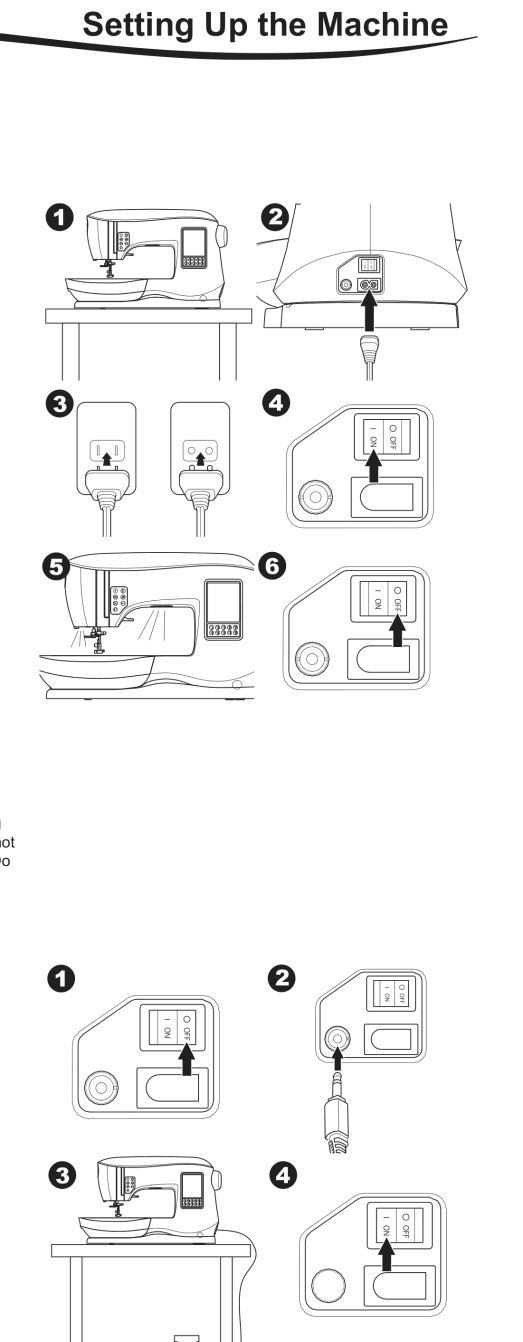
- Put the machine on a stable surface.
- Connect the power cord to the machine by pushing the 2-hole plug into the power cord connector.
- Plug the power cord into the wall socket.
- Turn on the power switch. The LED lights come on when the switch is turned on (symbol I).
- To disconnect, turn the power switch to O (off), then take the plug out of the socket.
Foot control
The foot control starts and stops the machine and sets the sewing speed.
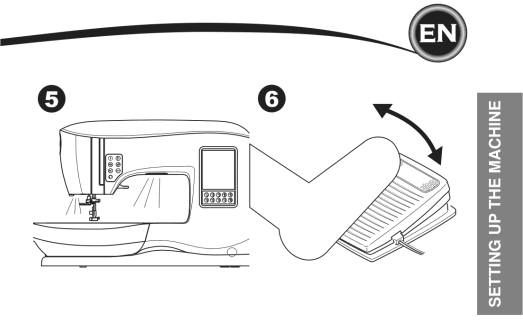
- Turn the power switch to O (off).
- Push the foot control plug into the connector on the machine.
- Put the foot control at your feet.
- Turn on the power switch. The LED lights come on.
- The harder you press the foot control, the faster the machine sews. The machine stops when you take your foot off.
- Only use the foot control supplied with the machine, or one supplied by an approved SINGER retailer.
- If you are unsure how to connect the machine to the power, ask a qualified electrician.
Packing away after sewing
- Turn the power switch to O (off).
- Unplug the cord from the wall socket, then from the machine.
- Unplug the foot control cord from the machine. Wind the cord round the foot control.
- Put all the accessories in the accessory tray. Slide the tray onto the machine round the free arm.
- Put the foot control in the space above the free arm.
Buttons, levers and dials
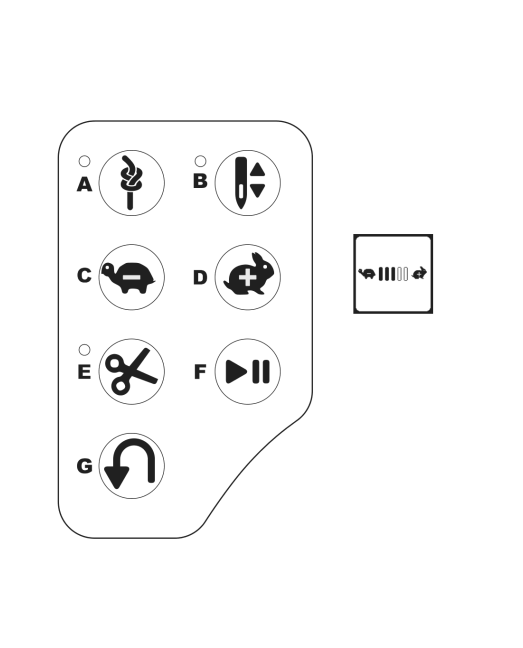
Tack button with LED indicator (A)
Press the tack button while sewing and the machine sews a few tack stitches and stops by itself. Pressed while not sewing, the machine sews a tack at the start of the next sewing and stops by itself. The LED stays lit until the tack stitch is done.
Needle stop position up/down button with LED indicator (B)
Press it to move the needle up or down. This also changes where the needle stops when you stop sewing. When the needle is set to stop down, the LED is lit. You can also tap the foot control to raise or lower the needle.
Speed control buttons (C, D)
Increase or decrease the sewing speed step by step. When you press either button, a pop-up shows the range of speed settings. With the foot control connected, these buttons set the top speed.
Thread cutter button with LED indicator (E)
Press it after sewing to cut the upper and bobbin threads - the LED comes on and both threads are cut automatically. To cut before the needle moves to the start of the next stitch, press it while sewing. The LEDs (A and E) come on and the machine cuts the threads when the stitch or sequence is finished.
- Do not press the thread cutter button with no fabric under the presser foot, or when there is no need to cut the threads. The thread may tangle and cause damage.
- Do not use it for thread thicker than #30, nylon thread or other speciality threads - use the thread cutter (I) on the left side of the machine instead.
- Do not use it when sewing with a twin needle or a hemstitching (wing) needle.
Start/stop button (F)
Press it to start the machine and press it again to stop. The machine runs slowly at the start of sewing.
Reverse button (G)
The machine sews in reverse while you hold the button down. Let go and it sews forwards.
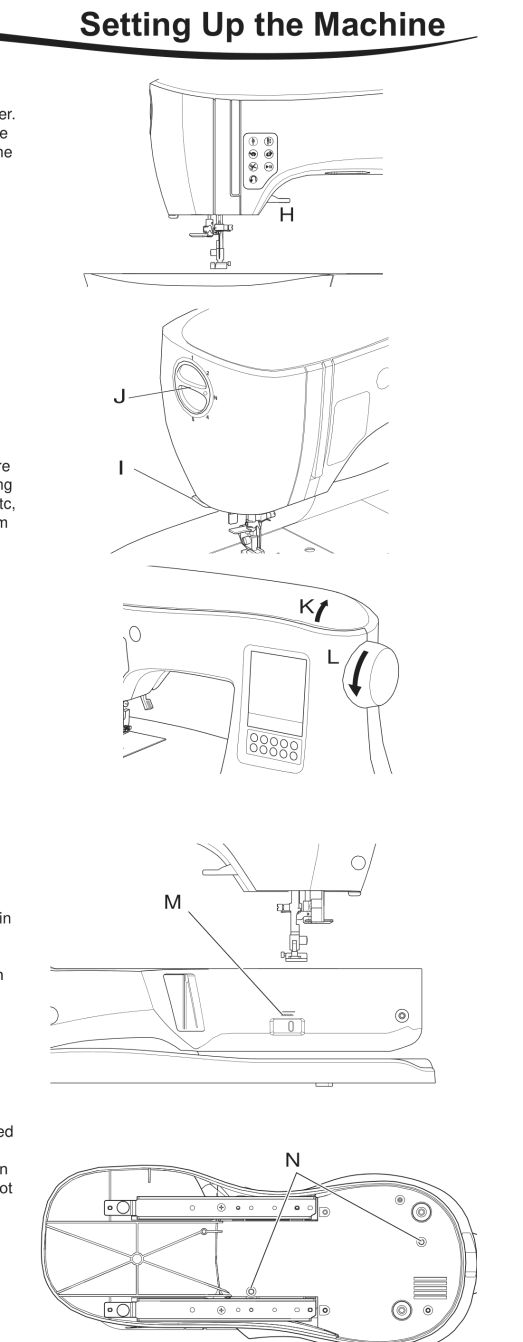
Presser foot lifter (H)
Raises and lowers the presser foot. For thick fabric or several layers, the foot can be raised higher to get the fabric under it more easily.
Thread cutter (I)
Use this cutter when you are not using the thread cutter button.
- Raise the presser foot and take the fabric and threads to the back after sewing.
- Hook the threads into the thread cutter from back to front.
- Pull the thread tails to cut the threads.
Presser foot pressure dial (J)
The right presser foot pressure lets the fabric feed properly. It depends mainly on the type and weight of the fabric. For lightweight fabrics such as sheers, batiste and voile, decrease the pressure. For heavy fabrics such as denim or canvas, increase it.
- To increase the pressure, turn the dial to 4 or 5.
- To decrease the pressure, turn the dial to 1 or 2.
- For most fabrics, turn the dial to N.
Lid (K)
To open the lid, lift the front right side of the cover.
Handwheel (L)
Turning the handwheel raises or lowers the needle. Always turn it towards you.
Raising and lowering the feed teeth (M)
The feed teeth sit under the needle plate, directly below the presser foot, and move the fabric along as you sew. The feed teeth lever is on the back of the machine at the base of the free arm.
- Slide the lever (M) to the right to raise the feed teeth for ordinary sewing. They come up when you start to sew, or when you turn the handwheel towards you one full turn.
- Slide the lever to the left to lower the feed teeth for sewing on buttons or free motion sewing.
Mounting the machine in a sewing cabinet (N)
There are two holes on the underside of the machine for fixing it into a sewing cabinet. Line them up with the holes in the cabinet base and fix the machine with screws (not included).
The rest of this manual is for our customers
35 more sections, including step-by-step guides, stitch settings and troubleshooting.
The full manual and our Live Sewing Advisor come free with every machine we sell.
Order a Singer C440 LegacyAlready a customer? Log inBought your machine somewhere else? Get the full manual, plus our Live Sewing Advisor for any sewing question, for 30 days.
Get 30 days' access - £10 one-offA one-off payment of £10 for 30 days - no subscription. Instant access by email, including every interactive sewing machine manual we have.