
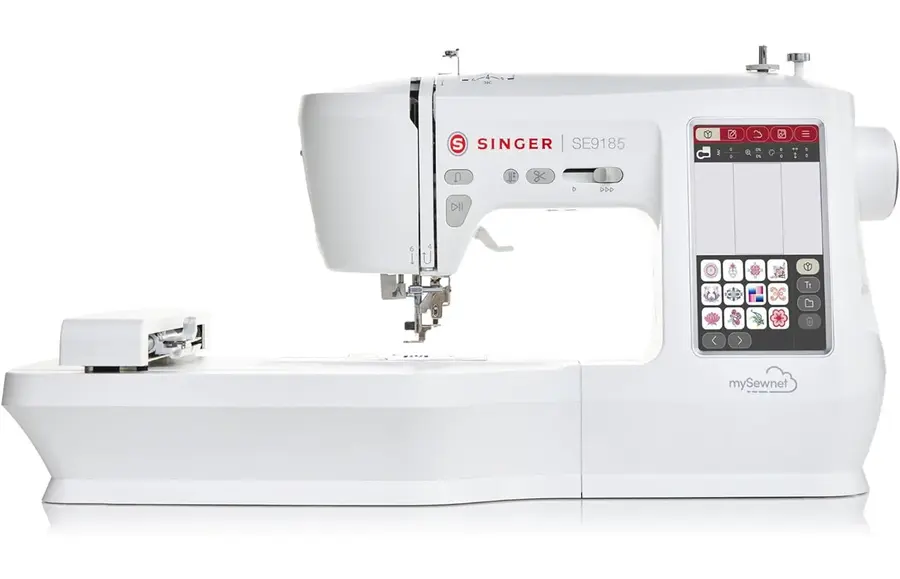
Your SINGER SE9185
Singer's instructions rewritten in plain English, with every setting kept exactly as Singer intended, and with tips from our team added along the way. It covers sewing and the full embroidery side of your machine. Stuck on something? Ask the Live Sewing Advisor at any point.
This manual applies to UK spec machines.
Important - please read: getting the best out of your machine
The questions our customers ask us most - worth two minutes before you start.
- 💡Raising the feed dogs again
The feed teeth (feed dogs) lever is at the back of the free arm. After moving it back up, turn the handwheel one full turn towards you - they only rise as the handwheel turns. - 💡Embroidery unit on = embroidery mode
With the embroidery unit attached you can only embroider. Clear the area and take the hoop off when it calibrates. Slide it off to sew normally. - 💡Hoop it tight, with stabiliser
Always hoop your fabric with stabiliser and get it taut like a drum. Loose fabric or no stabiliser is the main cause of puckered or distorted embroidery. - 💡Designs must be .VP3 files
The machine only reads embroidery designs in .VP3 format, from a FAT32 USB stick, the mySewnet cloud or its own memory. - 📦Keep the box and packaging
Please keep the box and packaging for your machine, should it ever need to be sent away for servicing or repair. - 🔄Stitching problems? Rethread first
If you ever have an issue with stitching, tension, looping or jamming, the first thing to do is rethread the machine. If the issue persists, change the needle and bobbin, clean out the bobbin area, and make sure no thread is stuck anywhere in the thread path or in the bobbin area. If you have tried all of these and are still having issues, please do get in touch with our support team. - 🧹Keep the bobbin area clean
We recommend you clean out your bobbin area with a brush or cotton bud every 4 to 6 bobbin changes, to keep your machine free of lint and debris. - 🔄Change your needle
To keep your machine stitching perfectly, we recommend changing your needle every 6 to 8 hours of sewing. We supply needles in different sizes and for different types of materials - including stretch, jeans/denim, leather, and multiple sizes of universal needles to suit the weight of the fabric. - 🧵Use good thread
Always try to use good quality branded threads such as Gutermann, Coats, Hemline or Mettler. Avoid non-branded threads, such as ones found in supermarkets or on some online marketplaces. - ✅Use the correct bobbin
With very few exceptions, Singer machines use Class 15 plastic bobbins. Always use the type that came with your machine - we recommend genuine bobbins only. Even slight differences in bobbin size or weight can cause the machine not to stitch correctly. - ⚙Let the machine feed the fabric
Modern machines have extremely good feeding mechanisms, designed to pull the fabric through the machine for you. Try to avoid pulling the fabric through to the point of bending the needle, as this can cause the needle to strike the bobbin case or needle plate. - 💬We are here to help
Always feel free to message us for help and advice on how to get the best out of your machine.
Getting to know your machine
Important safety instructions
When using an electrical appliance, basic safety precautions should always be followed, including the ones below. Read all the instructions before using this sewing machine. Keep them somewhere handy near the machine, and pass them on if the machine is given to someone else.
DANGER - to reduce the risk of electric shock
- Never leave the machine unattended while it is plugged in.
- The socket the machine is plugged into should be easy to reach.
- Always unplug the machine from the socket straight after use, and before cleaning, removing covers, oiling or making any other user adjustment mentioned in this manual.
WARNING - to reduce the risk of burns, fire, electric shock or injury
- This machine is intended for use by adults. It can be used with adult supervision by children aged 8 to 12, and by people with reduced physical, sensory or mental capabilities or lack of experience and knowledge, if they have been shown how to use it safely and understand the hazards involved. Children must not clean or maintain the machine without supervision. Nobody may play with the machine. Children under 8 must not use the machine.
- Do not let the machine be used as a toy. Take close care when it is used by or near children.
- Only use the machine for its intended purpose, as described in this manual. Only use attachments recommended by the manufacturer, as listed in this manual.
- Never use the machine if the cord or plug is damaged, if it is not working properly, or if it has been dropped, damaged or dropped into water. Take it to your nearest authorised dealer or service centre to be examined, repaired or adjusted, electrically or mechanically.
- Never use the machine with any of its air openings blocked. Keep the ventilation openings of the machine and the foot control free from lint, dust and loose cloth.
- Keep your fingers away from all moving parts. Take special care around the needle.
- Always use the correct needle plate. The wrong plate can cause the needle to break.
- Do not use bent needles.
- Do not pull or push the fabric while sewing. It can bend the needle and make it break.
- Wear safety glasses.
- Turn the power switch to O (off) when making any adjustment in the needle area - threading the needle, changing the needle, threading the bobbin, changing the presser foot and so on.
- Never drop or insert any object into any opening.
- Do not use outdoors.
- Do not use where aerosol (spray) products are being used or where oxygen is being given.
- To disconnect, turn all controls to off (O), then take the plug out of the socket.
- Do not unplug by pulling the cord. Hold the plug, not the cord.
- The foot control is used to run the machine. Never put anything else on the foot control.
- Do not use the machine if it is wet.
- If the LED light is damaged or broken, it must be replaced by the manufacturer, its service agent or a similarly qualified person, to avoid a hazard.
- If the cord connected to the foot control is damaged, it must be replaced by the manufacturer, its service agent or a similarly qualified person, to avoid a hazard.
- The noise level in normal use is less than 76dB(A).
- Only use the foot control supplied with the machine, or one supplied by an approved SINGER retailer.
Machine overview
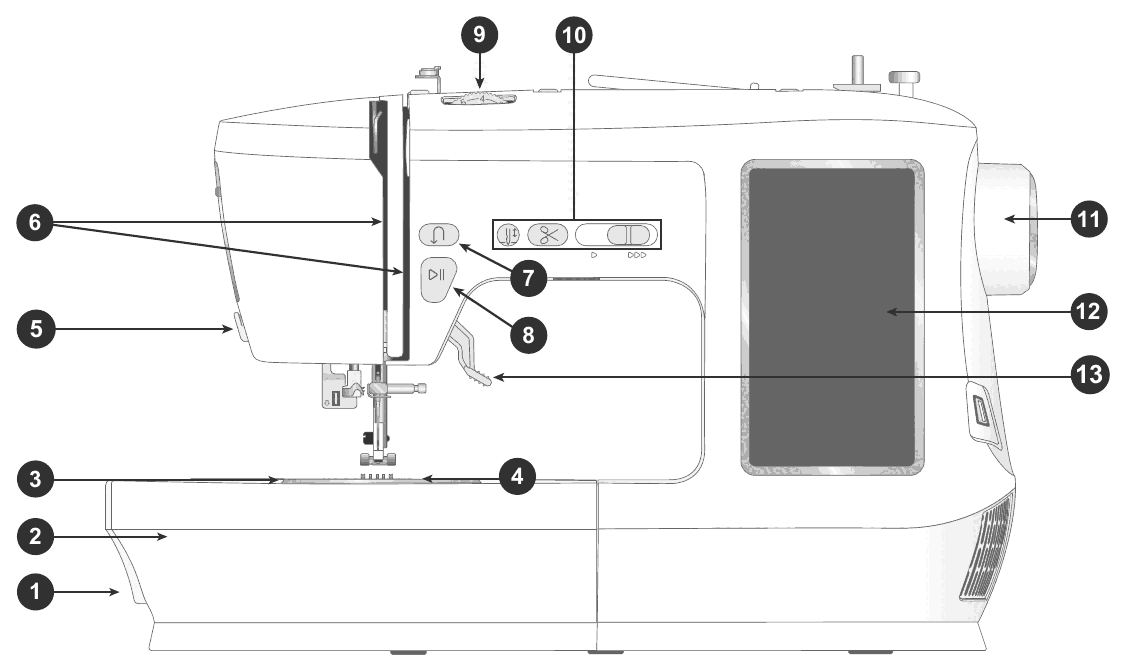
- Feed teeth lever - move it from side to side to lower or raise the feed teeth. It sits at the back of the free arm (see Lowering the feed teeth).
- Accessory tray / free arm - a flat surface for sewing and storage for your accessories. Take the accessory tray off to use the free arm, which makes trouser hems and sleeves easier.
- Needle plate - a flat area round the presser foot. The guide lines show common seam allowances.
- Bobbin cover - protects the bobbin while you sew. Push the button next to the cover to open it.
- Thread knife - for trimming the threads when you finish sewing.
- Threading slots - the thread path, with the tension discs and take-up lever.
- Reverse button - press and hold to sew in reverse or to tie off, for example at the start and end of a seam. Only works with straight stitch and zigzag (see Function buttons).
- Start/Stop button - starts and stops sewing without the foot control.
- Thread tension dial - sets the tension for your stitch, thread and fabric.
- Machine controls - the function buttons (see Function buttons).
- Handwheel - moves the needle and the thread take-up lever by hand.
- Touch screen - shows and controls everything the machine can do.
- Presser foot lifter - raises and lowers the presser foot.
Needle area, right side and top
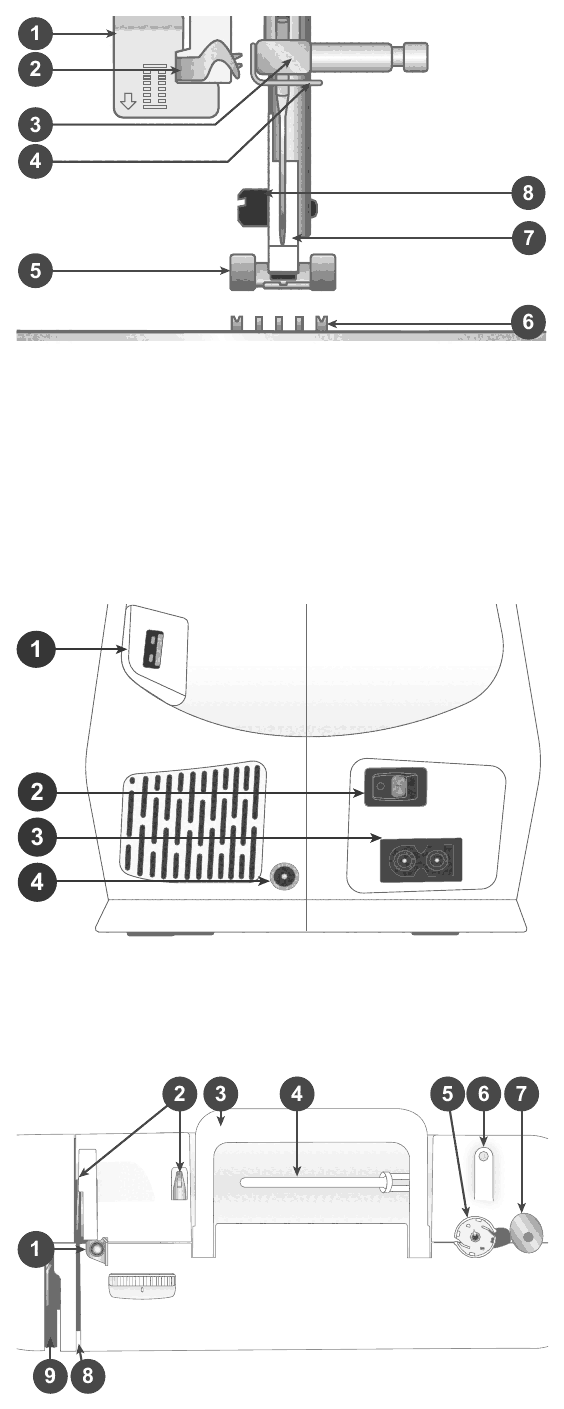
Needle area
- Buttonhole lever - used for buttonholes.
- Built-in needle threader - threads the needle quickly and easily.
- Needle bar with needle clamp screw - holds the needle.
- Needle thread guide - keeps the thread running smoothly as you sew.
- Presser foot - holds the fabric against the feed teeth, which draw it under the foot as you sew.
- Feed teeth - move the fabric under the presser foot as you sew.
- Presser foot ankle - holds the presser foot.
- Presser foot holder screw - loosen it to take off the presser foot holder (ankle).
Right side
- Built-in USB port
- ON/OFF switch
- Socket for the power cord
- Socket for the foot control
Top of the machine
- Bobbin winding tension disc
- Thread guides
- Handle
- Main spool pin
- Bobbin winder
- Hole for the auxiliary spool pin
- Bobbin winder lever
- Thread tension discs
- Thread take-up lever
Connecting to the power
The power cord and foot control are with the accessories. The sockets and the ON/OFF switch are at the bottom right-hand side of the machine.
- Plug the foot control cord into the front socket (A).
- Plug the power cord into the rear socket (B), then into the wall socket.
- Press the ON/OFF switch (C) to I to turn on the power and the light.
Your sewing speed is set by how hard you press the foot control. You can set the maximum speed with the speed control lever (see Function buttons).
Packing away after sewing
- Turn the power switch to O (off). A little power can stay in the machine for a few seconds afterwards, so the light may stay on briefly - this is normal for an energy-efficient appliance.
- Unplug the cord from the wall socket, then from the machine.
- Wind the cord round the foot control.
- Put all the accessories in the accessory tray and slide the tray back onto the machine round the free arm.
- Put the foot control and cord in the space above the free arm.
- Unplug the power cord whenever you are not using the machine.
- Only use the foot control supplied with the machine, or one supplied by an approved SINGER retailer.
- If you are unsure how to connect the machine to the power, ask a qualified electrician.
Useful for this
 Luxury Sewing Machine Bag£34.99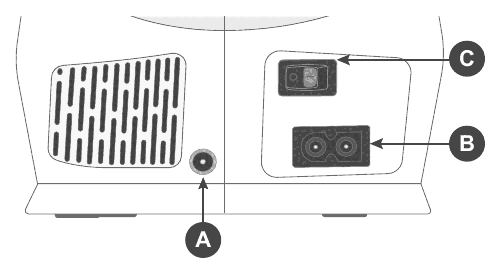
Function buttons and speed control
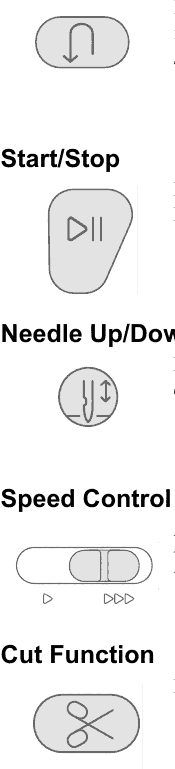
Reverse button
Press and hold to sew in reverse; let go to sew forwards again. The machine only sews in reverse while the button is held down. Reverse only works with straight stitch and zigzag - stitches 1-001 to 1-003, 1-008 and 1-010 to 1-012.
Start/Stop
Press to start sewing or embroidering without the foot control, and press again to stop.
Needle up/down
Press to set whether the needle stops up or down when you stop sewing. The needle moves up or down when you press it. You can also tap the foot control to raise or lower the needle once you have stopped.
Speed control lever
Every stitch has a recommended speed set in advance. Slide the lever left to sew slower and right to sew faster. You cannot go faster than the maximum speed set for the selected stitch.
Cut function
Press the cut button after you stop sewing and the machine cuts both the top and bobbin threads.
The touch screen and settings
Touch once on a button or setting to select it. To move a design in the embroidery area, touch it and, without letting go, slide your finger to the new position.
Common buttons
- OK - confirms changes and pop-up messages and goes back to the previous window.
- Cancel - cancels changes and pop-up messages and goes back to the previous window.
- Exit - leaves menus and settings and goes back to the previous window.
- Settings - opens the settings window. Recommended settings are set automatically when you load a stitch or design.
Machine settings
Touch the settings icon in the top right corner. Most machine settings are kept even when you turn the machine off.
- Language - changes all the text on the machine.
- Save from USB - copies files from your USB stick into the machine.
- Save to USB - copies files from the machine to your USB stick.
- Settings - more settings, depending on whether you are in sewing or embroidery mode.
- Firmware - view and update the machine firmware.
- Lock screen - locks the screen so you cannot change the stitch or settings by bumping it while you sew.
- Hoop selection - choose a different hoop size, including hoops you can buy separately.
- Clear download cache - removes all saved files from the machine memory to free up space.
- Restore to factory default settings - undoes every change made to the settings. Useful when troubleshooting, but it also erases your saved settings.
- Machine nickname - give your machine a name.
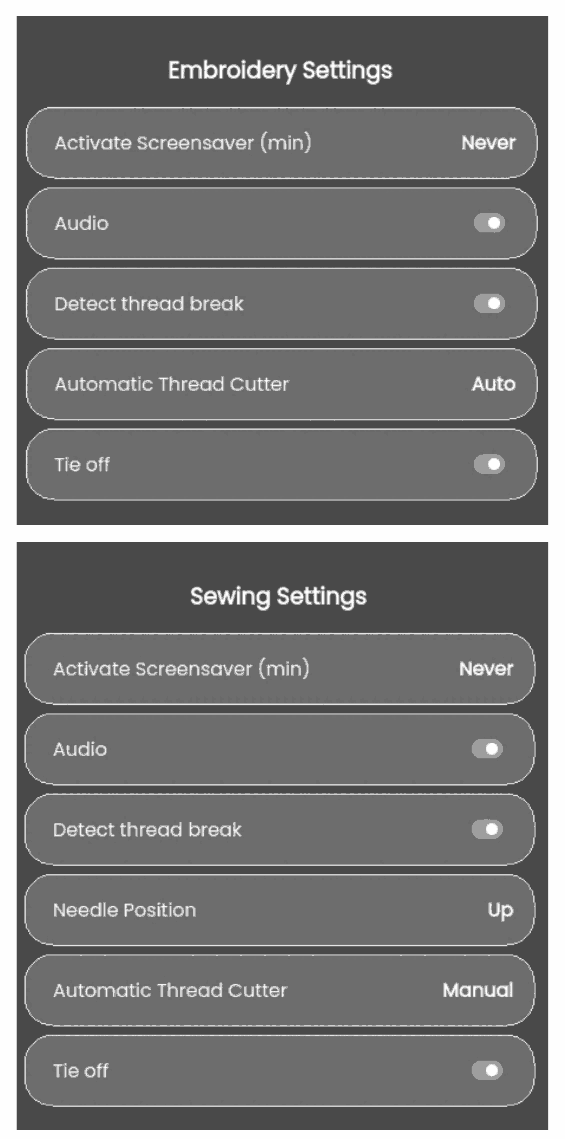
Sewing and embroidery settings
These are saved automatically, even when you turn the machine off.
- Activate screensaver (min) - how many minutes of inactivity before the screensaver comes on.
- Audio - turns all the machine sounds on or off. It is on to start with.
- Detect thread break - when on, a pop-up tells you if the thread breaks.
- Automatic thread cutter - when on, the threads are cut automatically after sewing a sequence or a single stitch such as a monogram or eyelet.
- Needle position - whether the needle stops up or down when you stop sewing.
- Tie off - turns the tie-off on or off (see Tie-off, mirroring and balance).
Updating the firmware with a USB stick
It is always best to have the latest firmware. Visit software.singer.com and find your machine to see the available updates.
- Download the firmware zip file and unzip it. Copy the .clo file to a USB stick. Do not rename it (it must be called sg_firmware_update.clo), do not put it in a folder, and make sure there is no older .clo file on the stick.
- Plug the USB stick into the USB port on the machine.
- Turn the machine on and touch the Menu button.
- Touch the firmware button. Once the update is checked, touch Install. Do not turn the machine off.
- Restart the machine when the update has finished. You can check the version number on the firmware page in the settings menu.
The rest of this manual is for our customers
42 more sections, including step-by-step guides, stitch settings and troubleshooting.
The full manual and our Live Sewing Advisor come free with every machine we sell.
Order a Singer SE9185 Sewing, Quilting and EmbroideryAlready a customer? Log inBought your machine somewhere else? Get the full manual, plus our Live Sewing Advisor for any sewing question, for 30 days.
Get 30 days' access - £10 one-offA one-off payment of £10 for 30 days - no subscription. Instant access by email, including every interactive sewing machine manual we have.